megakey
Standardization and extension of the Hyper (and Meh) key
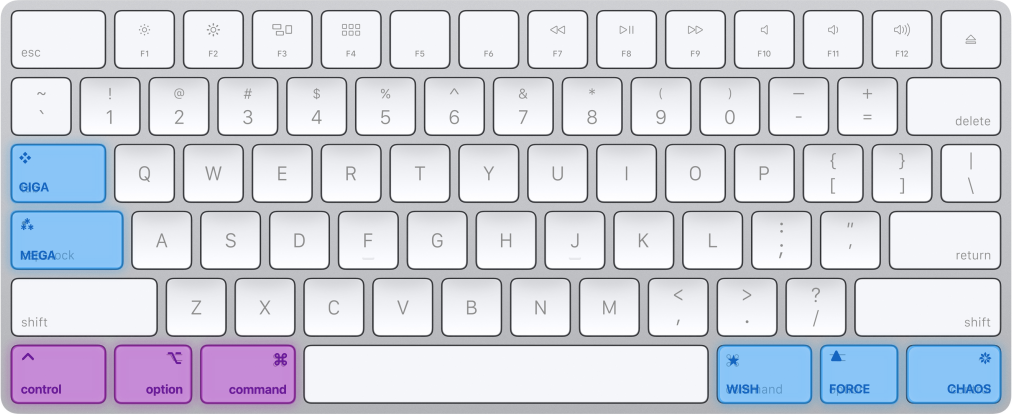
A system of 5 pseudo-modifier keys that works on standard keyboards
- Keyboard shortcuts that don’t conflict with system or app bindings.
- Can bind
Megafor universal cut/copy/paste/etc on both Windows (Ctrl) and MacOS (Cmd). (PlusMegais more comfortable/ergonomic!) - Opens up memorable keys like
Chaos-Vfor pasting from clipboard history. - Especially useful for global keybindings such as those required for transcription tools and windows managers.
MegaKey consists of two parts:
1. Mental tools (for your mind)
- Simplify complex combinations of modifiers to a single word or symbol.
- 5 pseudo-modifiers designed as single pseudo-modifier with 4 extra variations.
- Easier to remember/read/write/dictate:
Giga-C(❖C) vsShift-Ctrl-Option-Cmd-C(⇧⌃⌥⌘C). - The mental tools are cross-platform and work with standard keyboard layouts.
2. Software tools (for your fingers)
- Simplify complex/awkward combinations of modifiers to a single keypress via Karabiner-Elements
- For example:
CapsLockconverts toCtrl-Option-Cmd(tappingCapsLockby itself still results inCapsLock) - Presently MacOS-only, but straight-forward to implement on other platforms.
The 5 new pseudo-modifier keys
| Name | Single Key | Multiple Keys | Notes | |
|---|---|---|---|---|
| ⁂ | Mega | CapsLock | CtrlOptCmd | Base combination |
| ❖ | Giga | Tab | ShiftCtrlOptCmd | Mega with Shift |
| ❋ | Chaos | Right Ctrl | OptCmd | Mega without Ctrl |
| ▲ | Force | Right Option | CtrlCmd | Mega without Opt |
| ⭑ | Wish | Right Cmd | CtrlOpt | Mega without Cmd |
See detailed pseudo-modifier guide for:
- Design rationale
- Mnemonics to help remember
- Windows/Linux version
- Prior art
Quick Start
- Install Karabiner-Elements
- Import the MegaKey rule: Caps Lock → MegaKey
- Enable it in Karabiner-Elements → Complex Modifications
That’s it! Hold Caps Lock to activate MegaKey. Tap it for Escape.
[!TIP]
Press Fn+CapsLock to toggle Caps Lock on/off.
See detailed installation guide for:
- Manual installation
- Version that preserves CapsLock
License
MIT