megakey
MegaKey
- A proposed standardization and extension of the Hyper (and Meh) key
- A system of 5 pseudo-modifier keys that works on standard keyboards
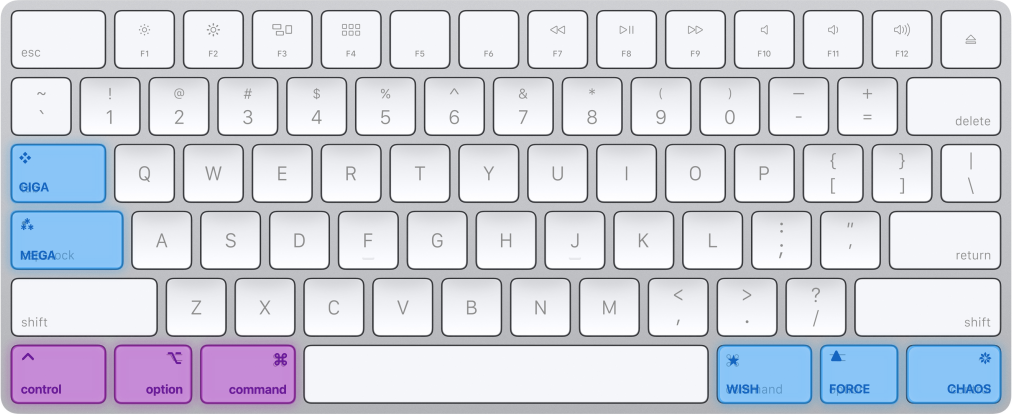
- Mental tools (for your mind): names and symbols for thinking about shortcuts.
- Software tools (for your fingers): single-key mappings via Karabiner-Elements on macOS.
- With the optional clipboard demo, Caps Lock+C copies and Caps Lock+V pastes.
Mental tools + Software tools
1. Mental tools (for your mind)
- Give a modifier combination a name and symbol:
Giga+C(❖C) instead of Shift+Ctrl+Opt+Cmd+C. - Think of Mega as the base pseudo-modifier, with four variations that each add or remove one modifier.
- Use the names to think about, read, write, or dictate shortcuts. The naming concept is platform-neutral.
2. Software tools (for your fingers)
- Reach a modifier combination with one physical key using Karabiner-Elements.
- Hold Caps Lock for Mega; tap it alone for Caps Lock in the default configuration.
- The supplied rules are macOS-only. There is no Windows or Linux implementation in this repository.
The five pseudo-modifiers
| Symbol | Name | Physical key (hold) | Equivalent keys | ⇧ | ⌃ | ⌥ | ⌘ | Relation to Mega |
|---|---|---|---|---|---|---|---|---|
| ⁂ | Mega | Caps Lock | Ctrl+Opt+Cmd | ⌃ | ⌥ | ⌘ | Base combination | |
| ❖ | Giga | Tab | Shift+Ctrl+Opt+Cmd | ⇧ | ⌃ | ⌥ | ⌘ | Add Shift |
| ❋ | Chaos | Right Ctrl | Opt+Cmd | ⌥ | ⌘ | Remove Control | ||
| ▲ | Force | Right Option | Ctrl+Cmd | ⌃ | ⌘ | Remove Option | ||
| ⭑ | Wish | Right Cmd | Ctrl+Opt | ⌃ | ⌥ | Remove Command |
These are names used by this project, not an adopted keyboard standard. You can assign the combinations in apps that accept custom shortcuts, though existing system or app bindings may already use them.
For examples that already work in popular apps, see Useful shortcuts.
Quick Start
You need macOS, a keyboard with Caps Lock, and Karabiner-Elements installed with its required permissions granted. You only need Tab and the right modifier keys if you enable their rules.
- Install Karabiner-Elements and finish its setup prompts.
- Import MegaKey (Caps Lock tap stays Caps Lock). If the link does not open, use the manual installation.
- In Karabiner-Elements, open Complex Modifications, choose Add rule (or Add predefined rule), and enable the Caps Lock rule and Optional clipboard demo individually. Leave the other rules disabled for now.
- In a text editor, type and select a few words. Hold Caps Lock, press C, then release both keys. Move the cursor, hold Caps Lock, and press V. The copied words should appear.
Without the optional demo, Mega+C/V sends the full Ctrl+Opt+Cmd combination; it does not automatically copy or paste. The demo overrides those two combinations, including when you press the three modifiers directly. Leave it disabled if you already use those shortcuts.
With the demo enabled:
- Shift+Caps Lock+V sends Cmd+Shift+V, used for paste without formatting in Google Docs and many web apps. Other apps may assign it differently.
- Shift+Caps Lock+C sends Cmd+Shift+C, whose action also depends on the app.
Prefer to check the keys without touching the clipboard? Leave the demo disabled and open Karabiner-EventViewer. Hold Caps Lock and press a letter: expect Control, Option, and Command with that letter. More checks cover all five combinations.
Choose what to remap
- The default file preserves Caps Lock when tapped. The Escape variant sends Esc instead.
- Both retain Tab on tap. Tap actions require releasing the key alone within Karabiner’s timeout (normally one second).
- Enable the Tab or right modifier rules only if you want them. Tab becomes Giga while held; the right modifiers lose their original function while their rules are enabled.
- Fn+Caps Lock can toggle Caps Lock in either variant if your keyboard exposes Fn to Karabiner. Some keyboards handle Fn internally.
To undo a mapping, remove its enabled entry from Complex Modifications. See installation and removal, the modifier guide, and the behavior reference.