megakey
Modifier guide
MegaKey names five combinations of ordinary modifiers. You can press the modifiers yourself or use the supplied macOS rules to put each combination on one key.
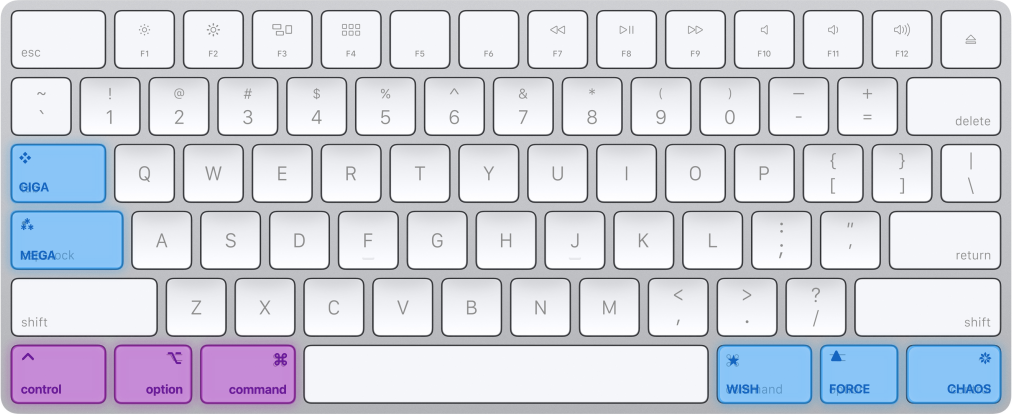
Mega and Giga
- Mega is a pseudo-key, not a physical key. It means Ctrl+Opt+Cmd.
- ⁂ represents the three modifiers. The name plays on “Meh” (“Meh”-ga), a name used for modifier combinations in other setups.
- Hold Caps Lock for Mega with its Karabiner rule enabled.
- Giga is Shift+Mega: Shift+Ctrl+Opt+Cmd. Its symbol, ❖, represents four modifiers.
- Think SI prefixes: Mega, then Giga. Hold Tab for Giga, or use Shift+Caps Lock.
                         ❖ Giga
                        +Shift
                           ^
                           |
  ⭑ Wish <-------------- ⁂ Mega --------------> ❋ Chaos
  -Command                 |                   -Control
                           v
                         ▲ Force
                        -Option
The four variations of Mega each add or remove one modifier. Tab still sends Tab when tapped alone; Caps Lock sends Caps Lock or Esc, depending on the file you chose.
The three “anti” keys
Each anti key is Mega with one modifier removed. Each also has a shifted version: Wish and Shift+Wish are distinct, while Shift+Mega is already Giga. Adding Shift to Giga leaves the same four-modifier combination.
Chaos
- The “anti-Control” key: Mega minus Control, or Opt+Cmd.
- Hold Right Ctrl for Chaos.
- Chaos is “uncontrolled.” Its symbol, ❋, resembles a Chaos Star.
Force
- The “anti-Option” key: Mega minus Option, or Ctrl+Cmd.
- Hold Right Option for Force.
- Force leaves no option. The triangle, ▲, recalls the Triforce.
Wish
- The “anti-Command” key: Mega minus Command, or Ctrl+Opt.
- Hold Right Cmd for Wish.
- “Your wish is my command.” A wish is a softer command; ⭑ is for wishing upon a star.
Enable each rule separately; an enabled right modifier rule replaces that key’s original function.
| Symbol | Name | Physical key (hold) | Equivalent keys | ⇧ | ⌃ | ⌥ | ⌘ | Relation to Mega |
|---|---|---|---|---|---|---|---|---|
| ⁂ | Mega | Caps Lock | Ctrl+Opt+Cmd | ⌃ | ⌥ | ⌘ | Base combination | |
| ❖ | Giga | Tab | Shift+Ctrl+Opt+Cmd | ⇧ | ⌃ | ⌥ | ⌘ | Add Shift |
| ❋ | Chaos | Right Ctrl | Opt+Cmd | ⌥ | ⌘ | Remove Control | ||
| ▲ | Force | Right Option | Ctrl+Cmd | ⌃ | ⌘ | Remove Option | ||
| ⭑ | Wish | Right Cmd | Ctrl+Opt | ⌃ | ⌥ | Remove Command |
The behavior reference covers taps, shifted combinations, and the optional clipboard demo. See also useful shortcuts in apps.
Relation to Hyper and Meh
Hyper and Meh are established names for multi-modifier mappings, but usage varies between setups. Hyper often means all four modifiers, the combination MegaKey calls Giga. MegaKey uses explicit definitions for five related combinations; it does not require you to replace a working Hyper setup or use a new remapping engine.
For shortcuts, write Giga+C or ❖C instead of Shift+Control+Option+Command+C. These names do not assign actions by themselves. You still need to bind shortcuts in an app or enable a rule such as the optional clipboard demo.
Names on Windows and Linux
The naming concept can be carried to Windows or Linux using Control, Win/Super, and Alt. This repository supplies no remapping software for those platforms. The following is a naming proposal, not an installable configuration.
- “Sub” is the opposite of Super; “Main” is the opposite of Alt (alternate).
- Write
Sub.ForceandMain.Wish, or shorten them toSubandMain. The symbols stay the same.
                         ❖ Giga
                        +Shift
                           ^
                           |
  ⭑ Main <-------------- ⁂ Mega --------------> ❋ Chaos
  -Alt                     |                   -Control
                           v
                         ▲ Sub
                       -Win/Super
| Symbol | macOS name and combination | Windows/Linux name and combination | Omitted key |
|---|---|---|---|
| ⁂ | Mega: Ctrl+Opt+Cmd | Mega: Ctrl+Win/Super+Alt | None |
| ❖ | Giga: Shift+Ctrl+Opt+Cmd | Giga: Shift+Ctrl+Win/Super+Alt | None; add Shift |
| ❋ | Chaos: Opt+Cmd | Chaos: Win/Super+Alt | Control |
| ▲ | Force: Ctrl+Cmd | Sub.Force: Ctrl+Alt | Option / Win/Super |
| ⭑ | Wish: Ctrl+Opt | Main.Wish: Ctrl+Win/Super | Command / Alt |
Related work
The Space-cadet keyboard had a physical Hyper key. Modern remapping tools bring similar combinations to ordinary keyboards. Examples and discussions include: